
9 Best Attention Span Apps For Your Phone
| App Name | Best For | Key Features | AC Rating | Pricing |
|---|---|---|---|---|
| Life7 | All-in-One Mental Wellness | Binaural beats, guided meditation, sleep stories | 4.8/5 | Free trial, then subscription |
| Forest | Gamified Focus Training | Virtual tree planting, real tree donations, Pomodoro timer | 4.5/5 | One-time purchase |
| Brain.fm | Science-Backed Focus Music | Neural phase-locking audio, customizable sessions, offline mode | 4.6/5 | Free trial, then subscription |
| Freedom | Blocking Distractions | Cross-device syncing, locked mode, scheduled sessions | 4.4/5 | Free version, premium subscription |
| Headspace | Meditation Beginners | Guided meditations, focus playlists, sleep content | 4.5/5 | Free trial, then subscription |
| Opal | Screen Time Control | Deep Focus mode, gamified tracking, leaderboards | 4.3/5 | Free version, premium subscription |
| Lumosity | Brain Training Games | 40+ cognitive games, personalized workouts, progress tracking | 4.2/5 | Free version, premium subscription |
| Flipd | Study Sessions | Focus timers, community groups, wellness resources | 4.1/5 | Free version, premium subscription |
| Noisli | Ambient Background Sounds | Customizable soundscapes, text editor, productivity playlists | 4.3/5 | Free version, premium subscription |
#1. Life7 – Best for All-in-One Mental Wellness
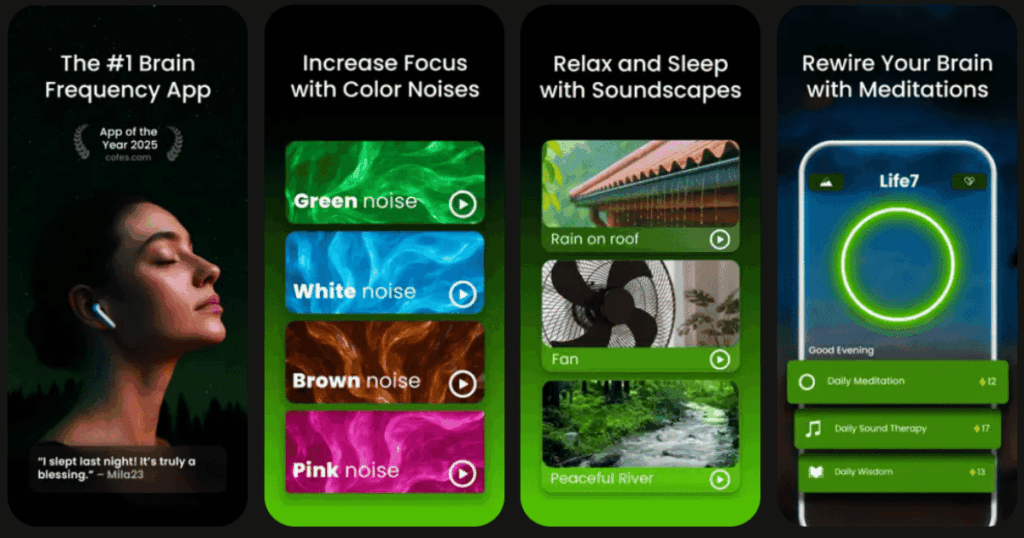
If you want one app that does everything, Life7 is the answer. This app combines meditation, sleep sounds, and brainwave music all in one place. It has over 1200 editorial mentions and users have logged more than 312 million meditation minutes.
What makes Life7 special is its huge variety of content. You get green noise, white noise, brown noise, and pink noise for focus. The app also offers delta, theta, alpha, beta, and gamma wave music. These sounds help your brain stay focused and calm.
Life7 includes binaural beats and isochronic tones to boost your attention. You can also try 432 Hz, 528 Hz, and Solfeggio frequencies. Many users say these sounds help them think more clearly.
Key Features:
- SOS sessions for anxiety and panic attacks, plus breathing exercises to calm your nervous system
- Daily check-ins, meditations, music therapy, and wisdom sessions that update every day
- Gamified approach where you earn XP and unlock premium soundscapes by completing sessions
What I like: I love how Life7 covers so many different needs in one app. The backdrop mode lets you mix soundscapes with meditations or sleep stories. This means you can create your perfect focus environment. The nervous system reset feature is amazing when I feel overwhelmed. The CBT tools and hypnotherapy sessions go beyond what other apps offer. Plus, the lucid dreaming guides are really fun to try.
What I don’t like: The free content is a bit limited. You really need the paid version to access the best features. Some users might feel pressured to subscribe right away.
Pricing: 7 day free trial available. Weekly, monthly, and yearly plans offered. Frequent special offers pop up.
Platforms: iOS and Android
#2. Forest – Best for Gamified Focus Training
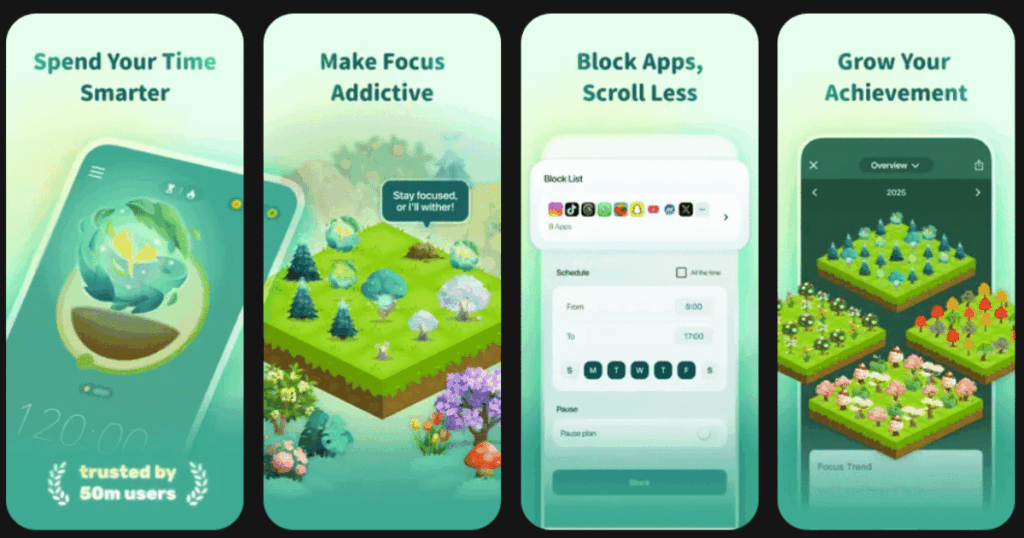
Forest turns focus into a fun game. When you need to concentrate, you plant a virtual tree. If you stay focused, your tree grows. But if you leave the app to check social media, your tree dies. It sounds simple, but it really works.
The app uses the Pomodoro technique. You set timers between 10 minutes and 2 hours. As you complete sessions, you build your own virtual forest. Over time, your forest shows how much focused work you have done.
The best part is the real tree program. Forest team partners with a real tree planting organization, Trees for the Future, to plant real trees on earth. Over 1,500,000 real trees were planted on Earth by Forest users.
Key Features:
- Timer mode and stopwatch mode for flexible focus sessions
- Statistics and progress tracking to see your focus habits
- Plant together feature lets you focus with friends and family
What I like: I really appreciate that Forest uses gentle motivation instead of harsh restrictions. The psychological motivation of not wanting to kill your tree is surprisingly powerful for most users. The app is super easy to use. You can start being productive within 30 seconds of downloading. I also love that my focused time helps plant real trees around the world.
What I don’t like: Forest has limited functionality compared to full featured focus apps like Freedom. It cannot block specific websites on mobile and only locks you in the Forest app. If you really want to cheat, you can just close the app.
Pricing: One time purchase on iOS for a few dollars. Android has a free version with ads or a small fee to remove them.
Platforms: iOS and Android
#3. Brain.fm – Best for Science-Backed Focus Music

Brain.fm is not regular music. The app uses patented neural phase locking which enables populations of neurons to engage in various kinds of coordinated activity. In simple terms, the music is designed to help your brain focus better.
When you open the app, you choose what mental state you want. Options include focus, relax, sleep, and meditate. For focus mode, you can pick deep work, creative flow, or light work. Brain.fm’s focus music has been proven to boost focus associated beta brainwaves by 119%.
The science behind Brain.fm is real. Research is funded by National Science Foundation and published in the journal Nature Communications.
Key Features:
- Personalized focus music that streams without you searching for songs
- Built in Pomodoro timer with motivational quotes
- Offline mode so you can download tracks and listen anywhere
What I like: Before I was having a lot of trouble concentrating for long periods of time but after trying this I can focus for upwards of one hour without any problems. The neural effect levels let you adjust intensity based on how much help your brain needs. I also like the huge library of genres from lo-fi to classical to ambient sounds.
What I don’t like: The diversity in their music library could use improvement. The selection can feel limited over time, especially for long term users. The pace of adding new tracks is slow.
Pricing: Free trial available. Monthly or yearly subscription options.
Platforms: iOS and Android
#4. Freedom – Best for Blocking Distractions

Freedom takes a tough love approach to focus. Freedom is the only app that can sync blocking sessions across all your devices. This means you can start a session on your desktop, and distracting apps on your phone get blocked too.
You can block social media, email, streaming sites, or even the entire internet. Sessions can be recurring or on demand. It even includes a locked mode to prevent disabling it mid focus.
Freedom users report gaining an average of 2.5 hours of productive time every day.
Key Features:
- Block websites, apps, and even the entire internet across all devices
- Locked mode that prevents you from stopping the session early
- Schedule and automate sessions so blocking happens automatically
What I like: After one week of daily 90 minute blocks, average screen time dropped by 34%. I love that Freedom removes the temptation completely. The app also has ambient focus sounds built in. You can plan daily or weekly focus windows so you never forget to block distractions.
What I don’t like: Freedom has a block list approach where you either need to block the whole internet or specify which websites you want to block. For highly distractible people, this can be tricky since there are endless distractions online.
Pricing: Free version with limited features. Premium subscription for full access.
Platforms: iOS, Android, Mac, Windows, and Chrome
#5. Headspace – Best for Meditation Beginners
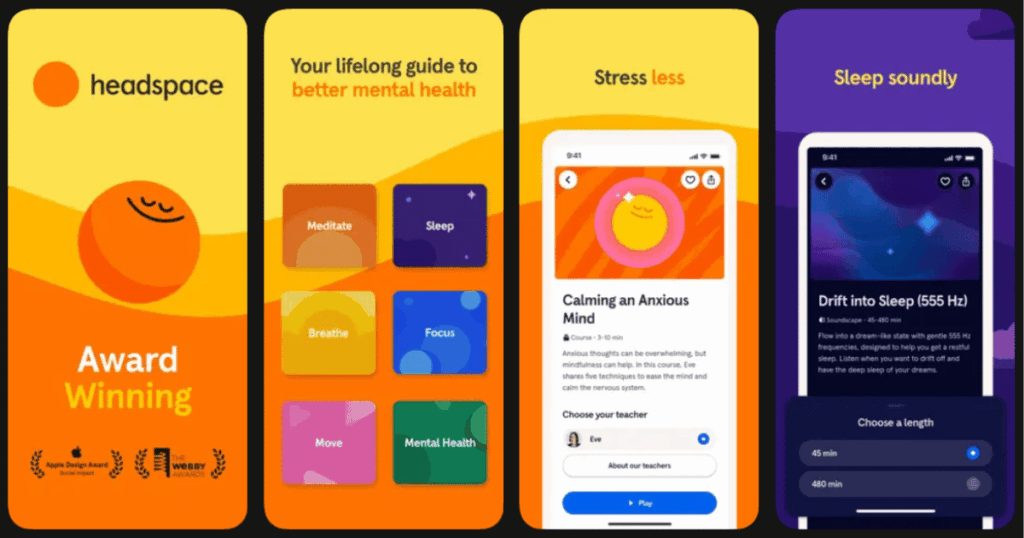
Headspace makes meditation simple and approachable. Headspace can be a great choice for anyone looking to try meditation for the first time. It is affordable, simple, and easy to use.
The app teaches eight helpful techniques from Buddhist traditions. These include noting, visualization, focused attention, and body scans. A 2018 study suggests that a 15 minute mindfulness meditation session can cut mind wandering by 22 percent.
The Focus tab offers music and meditation playlists specifically designed to help you concentrate on work.
Key Features:
- Beginner courses that teach meditation step by step
- Focus sessions designed to improve concentration and reduce mind wandering
- Sleepcasts and bedtime meditations for better rest
What I like: Starting my day with these meditations allowed me to approach my work with a clearer mind and more focused energy. The animations explaining techniques are really helpful. I also love the Focus sessions during my afternoon slump. Instead of reaching for coffee, a five minute meditation gives me a mental boost.
What I don’t like: Most content is locked, including the kid specific meditations. The subscription price can feel steep for some users.
Pricing: Free trial with basic content. Subscription required for full access.
Platforms: iOS and Android
#6. Opal – Best for Screen Time Control
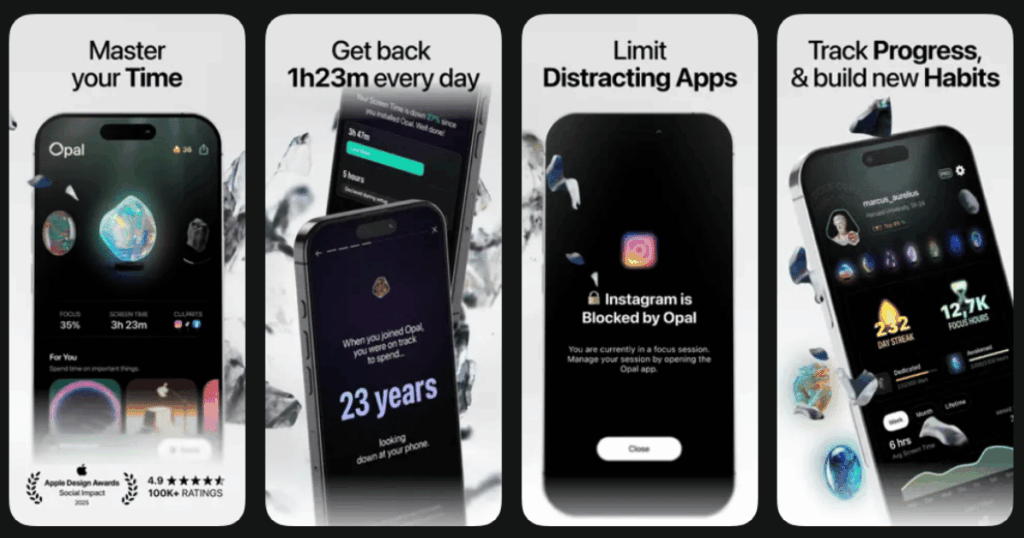
Opal helps you take back control of your phone. Join a community of over 4 million on the world’s favorite Screen Time app. The app blocks distracting apps and shows you exactly where your time goes.
One of the strongest features is Deep Focus. It locks your sessions so you cannot stop them early. This is perfect when you need maximum discipline.
The app also gamifies your progress. You earn gems and streaks as you stay focused. There is even a leaderboard if you want to compete with friends.
Key Features:
- Deep Focus mode that cannot be bypassed or canceled
- Focus Score that tracks your screen time and measures progress in real time
- Community leaderboards to compete with friends
What I like: Deep focus mode forces me to channel my energy positively. It has made me more productive and helped me evaluate my relationship with technology. I appreciate the detailed insights about my phone habits. The mini games to fight brain rot are a fun addition.
What I don’t like: The full version costs around $100 per year. There is a free version, but it is limited. Also, Opal only works on iOS and macOS right now.
Pricing: Free version available. Premium subscription for full features.
Platforms: iOS and macOS only
#7. Lumosity – Best for Brain Training Games

Lumosity takes a different approach. Instead of blocking distractions, it trains your brain to focus better. Lumosity is a leading brain training app, used by over 100 million people worldwide to play cognitive games that exercise memory, attention, problem solving and more.
The app offers over 40 brain games that adapt as you play. The cognitive domains included in the suite of Lumosity exercises include processing speed, attention, memory, reasoning and problem solving.
Each exercise automatically adjusts difficulty as your performance improves. This keeps you challenged without getting frustrated.
Key Features:
- Personalized daily brain workouts based on your habits and goals
- Games targeting attention, memory, speed, flexibility, and problem solving
- Progress tracking to see improvement over time
What I like: Using Lumosity, students will not just be improving game scores. They will also improve their brain function across the board, making things like homework and focusing in class a little easier. The games feel fun, not like work. I enjoy watching my skills improve over time.
What I don’t like: Lumosity only works well if you spend money. You only get 3 games with the free version. The premium subscription is needed to access most features.
Pricing: Free version with limited games. Premium subscription for full access.
Platforms: iOS and Android
#8. Flipd – Best for Study Sessions
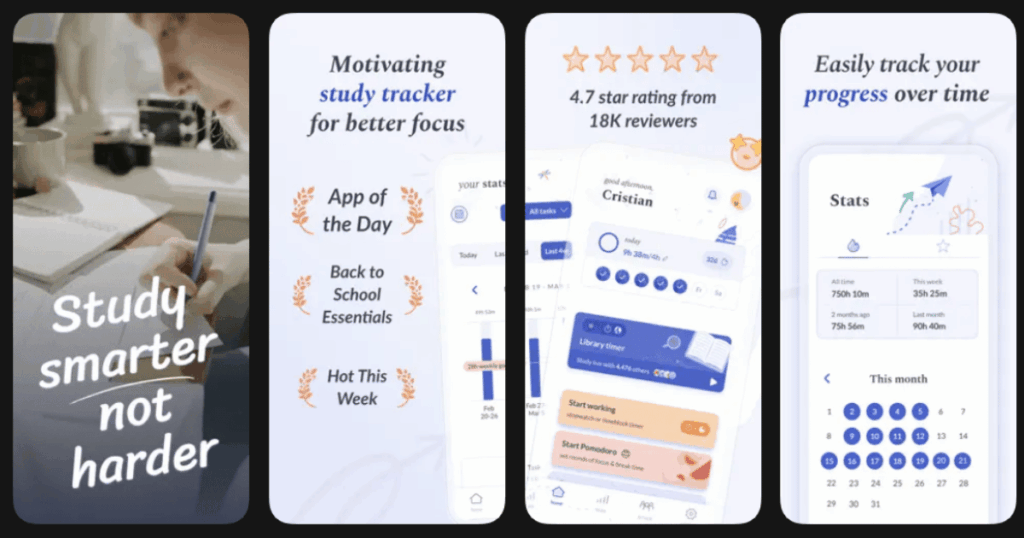
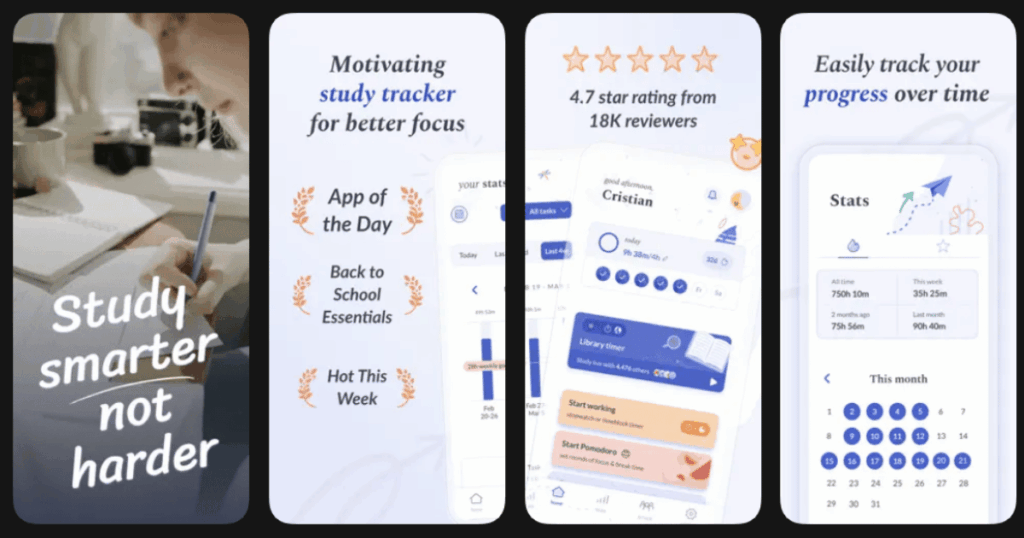
Flipd is designed for students and productivity enthusiasts. The custom timers are my favorite! You can set a time goal for whatever activity you do, whether it is working out, studying, classes, time you spend with yourself, or even the time you spend meditating.
The app includes community features where you can focus alongside others. Work together in public study rooms and clubs to feel motivated and supported by a positive community.
Flipd also tracks your progress with detailed statistics and milestone badges.
Key Features:
- Custom productivity timers with tags for different activities
- Study rooms and community groups for accountability
- Wellness hub with meditation, breathing exercises, and focus music
What I like: I love the Study Live timers, because I know that someone, somewhere, is focusing at the same time as me! The community aspect adds accountability. I also appreciate the lofi background music for creating the perfect study atmosphere.
What I don’t like: When I first started using Flipd, I found it incredibly useful. However, I watched over time as they slowly hid more of their features under the premium subscription. The free version now has limited session lengths.
Pricing: Free version available. Premium subscription for extended features.
Platforms: iOS and Android
#9. Noisli – Best for Ambient Background Sounds
Sometimes all you need is the right background noise. Noisli’s robust library of sounds, which range from the gentle hum of a coffee shop to the rhythmic patter of raindrops, can create your optimal workplace environment and keep you in the zone.
The app lets you mix and match different sounds to create your perfect focus environment. Some people concentrate best with white noise. Others prefer rain or nature sounds.
Noisli also includes a text editor so you can write without switching apps.
Key Features:
- Mix and match different ambient sounds to create custom soundscapes
- Save your favorite sound combinations as presets
- Built in text editor for distraction free writing
What I like: I love creating my own unique sound mix. The flexibility means I can adjust the environment based on what task I am doing. The presets save time when I need to focus quickly.
What I don’t like: The app is simpler than others on this list. It only provides background sounds without meditation or brain training features.
Pricing: Free version with basic features. Pro plan for full access.
Platforms: iOS, Android, and Web
Do Attention Span Apps Really Work?
Yes, attention span apps can really help you focus better. Research from 2019 examined the effects of using Headspace to do short mindfulness meditations a few times per week for 8 weeks. The results suggest that the sessions have a positive effect on overall well being, daily positive affect, and job strain.
Different apps work for different people. Some folks need distraction blockers like Freedom or Opal. Others benefit from brain training games like Lumosity. And many people find that meditation apps like Life7 or Headspace help them build lasting focus skills.
The key is finding the right app for your needs and using it consistently.
How Long Does It Take to Improve Attention Span?
Improving your attention span takes time and practice. Most people start noticing small improvements within one to two weeks of regular app use. But real, lasting changes usually take at least 30 days.
Think of it like building a muscle. You would not expect to get strong after one gym session. The same goes for your brain. Regular practice with focus apps helps you build mental stamina over time.
Start with short sessions and gradually increase the duration as your focus improves.
What Is the Best Free App for Attention Span?
If you want a free option, Forest offers a free version on Android with ads. Freedom also has a free tier with limited features. Lumosity lets you play three games daily for free.
However, most attention span apps work best with their paid versions. The investment is usually worth it for the full feature set. Life7 offers a 7 day free trial so you can test all features before committing. This lets you experience everything the app has to offer without risk.