
9 Best Minimalist Apps For Your Phone
| App Name | Best For | Key Features | AC Rating | Pricing |
|---|---|---|---|---|
| Life7 | All-in-one mental wellness | Binaural beats, guided meditations, sleep stories | 4.8/5 | Free trial, then subscription |
| Minimalist Phone | Reducing screen time with a clean interface | App blocking, monochrome mode, notification filters | 4.6/5 | Free trial, then subscription |
| Opal | Blocking distracting apps effectively | Deep focus mode, usage analytics, gamified rewards | 4.5/5 | Free trial, then subscription |
| Niagara Launcher | One-handed phone navigation | Wave alphabet, embedded notifications, minimalist design | 4.7/5 | Free with Pro upgrade |
| One Sec | Breaking impulsive app opening habits | Breathing exercises, intention prompts, usage insights | 4.4/5 | Free trial, then subscription |
| Forest | Staying focused through gamification | Virtual tree planting, focus timer, real tree planting | 4.6/5 | One-time purchase |
| ScreenZen | Customizable screen time limits | Usage caps, breathing prompts, app limits | 4.3/5 | Free with donations |
| Before Launcher | Text-only phone experience | No icons, filtered notifications, focus modes | 4.4/5 | Free with Pro upgrade |
| Blank Spaces | Creating a calm home screen | Custom widgets, hidden apps, minimal aesthetics | 4.2/5 | One-time purchase |
#1. Life7 – Best for All-in-One Mental Wellness

Life7 is a complete mental wellness app that helps you sleep better, reduce stress, and find calm. It combines everything you need for mindfulness in one place. You get guided meditations, sleep stories, breathing exercises, and sound therapy.
The app uses science-backed sounds like binaural beats and solfeggio frequencies. These help your brain relax and focus. Whether you want to calm anxiety or improve sleep quality, Life7 has tools for you. It has earned over 1,200 editorial mentions and helped users complete more than 312 million meditation minutes.
Key Features:
- Delta, Theta, Alpha, Beta, and Gamma wave music plus pure binaural beats and isochronic tones
- SOS sessions for panic attacks, CBT tools, and hypnotherapy for deep emotional healing
- Daily check-ins, mood tracking, gamified XP system, and streak building with friends
What I like: I really appreciate how Life7 combines so many wellness tools into one app. The sound therapy options are incredible. You get green noise, white noise, brown noise, and pink noise. The backdrop mode lets you mix soundscapes with meditations, which creates a personalized experience. The gamified approach keeps me coming back. Earning XP and unlocking new content makes meditation feel rewarding instead of like a chore.
What I don’t like: The free content is a bit limited. You will want to upgrade to get the full experience. Some users might feel pushed toward the subscription too quickly.
Pricing: 7 day free trial available. Weekly, monthly, and yearly plans offered. Frequent special offers pop up.
Platforms: iOS and Android
#2. Minimalist Phone – Best for Reducing Screen Time With a Clean Interface
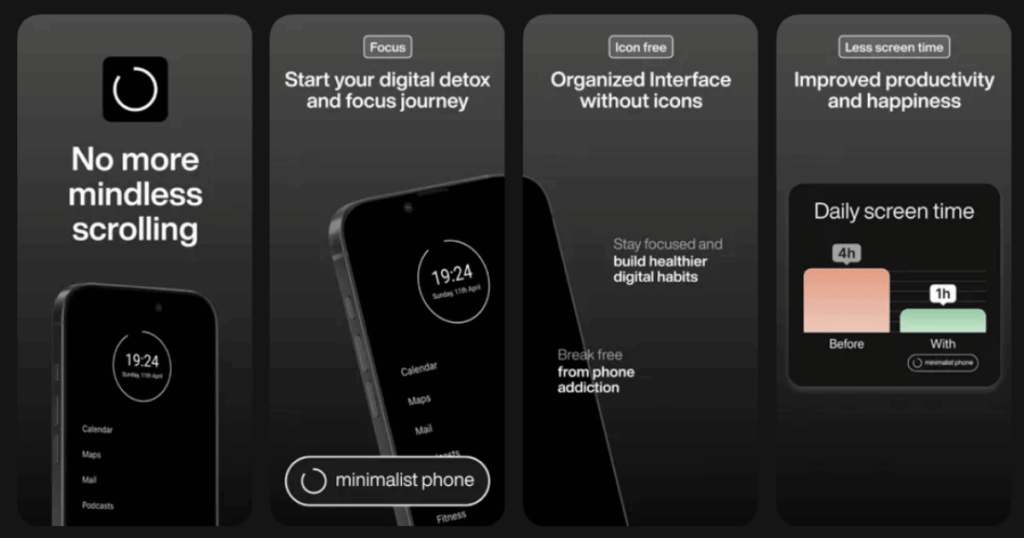
Minimalist Phone transforms your Android into a distraction-free device. It replaces your colorful home screen with clean text. No flashy icons or widgets to tempt you.
The app helps you build healthier phone habits. About 93% of users report spending less screen time after just three days. It uses smart features like app blocking and notification filtering. Your phone becomes a tool again instead of a time sink.
Key Features:
- Text-only interface that removes visual clutter and colorful icons completely
- Monochrome mode that turns your entire screen grayscale
- App blocker with scheduling and time limits for specific apps
What I like: This app changed my relationship with my phone. The simple interface makes me think twice before opening distracting apps. I love how the notification filter keeps unimportant alerts out of sight. After using it for a while, I often forget where I put my phone. That is a good sign.
What I don’t like: The interface can feel slightly glitchy sometimes. It occasionally does not register taps right away. Also, some people might find it too extreme at first.
Pricing: Free trial available. Monthly, annual, and one-time purchase options.
Platforms: Android only
#3. Opal – Best for Blocking Distracting Apps Effectively
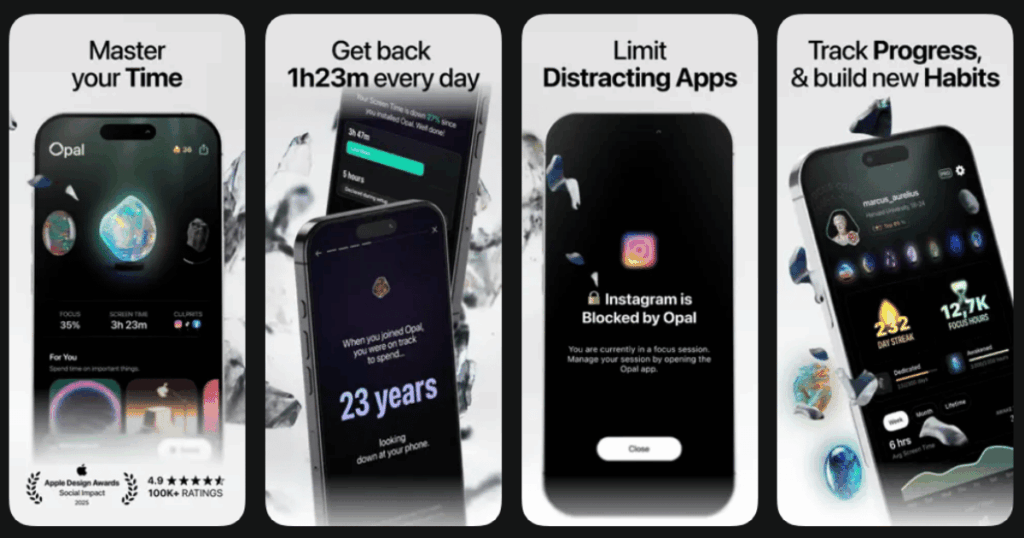
Opal is the top screen time control app for iPhone users. It uses Apple’s Screen Time API to create powerful blocks on distracting apps. The Deep Focus mode is nearly impossible to bypass.
The app gamifies your progress with gems and streaks. You can compete on leaderboards with friends. Opal also provides detailed analytics so you can see exactly where your time goes. Many users report saving hours each day.
Key Features:
- Deep Focus mode that creates unbypassable app blocks during focus sessions
- Detailed usage analytics with personalized insights and Focus Score
- Community leaderboards and rewards system with collectible gems
What I like: Opal’s Deep Focus mode is a game changer. When I set it, I truly cannot access my blocked apps. The analytics are eye-opening. Seeing my potential lifetime phone usage in the Focus Report motivated me to change. The gem collection makes reducing screen time feel fun instead of punishing.
What I don’t like: The app is mainly for iPhone users. Android support is limited. Some features require the paid subscription to access.
Pricing: Free version available. Weekly, monthly, annual, and lifetime subscriptions offered.
Platforms: iOS primarily, limited Android support
#4. Niagara Launcher – Best for One-Handed Phone Navigation
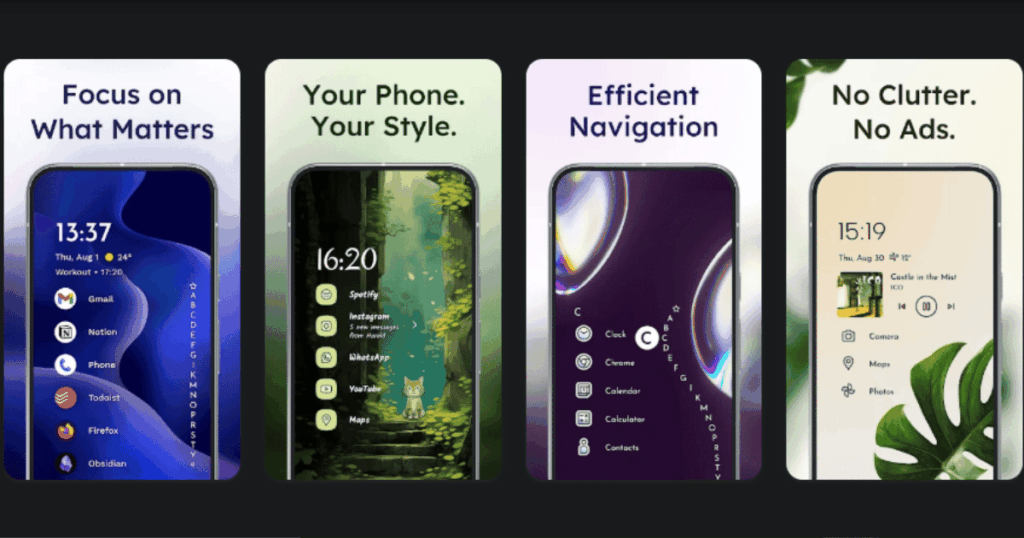
Niagara Launcher reimagines the Android home screen. It replaces the traditional grid with a vertical list of your favorite apps. Everything is reachable with one hand.
The wave alphabet feature lets you scroll through all apps quickly. Just swipe on the side of your screen. Notifications appear right on your home screen next to related apps. You can act on them without opening the notification shade.
Key Features:
- Wave alphabet for quickly finding any app with a single thumb gesture
- Embedded notifications that appear next to their related apps on the home screen
- Automatic media player appearance when headphones connect
What I like: Niagara feels smooth and thoughtful. The notification integration is brilliant. I can reply to messages without leaving my home screen. The headphone feature is clever too. When I plug in, my music apps automatically appear. The minimalist look has genuinely reduced my mindless scrolling.
What I don’t like: Customization options are limited compared to launchers like Nova. If you want to tweak every little detail, Niagara might frustrate you. Some premium features feel expensive.
Pricing: Free version with ads. Pro upgrade available as subscription or one-time purchase.
Platforms: Android only
#5. One Sec – Best for Breaking Impulsive App Opening Habits
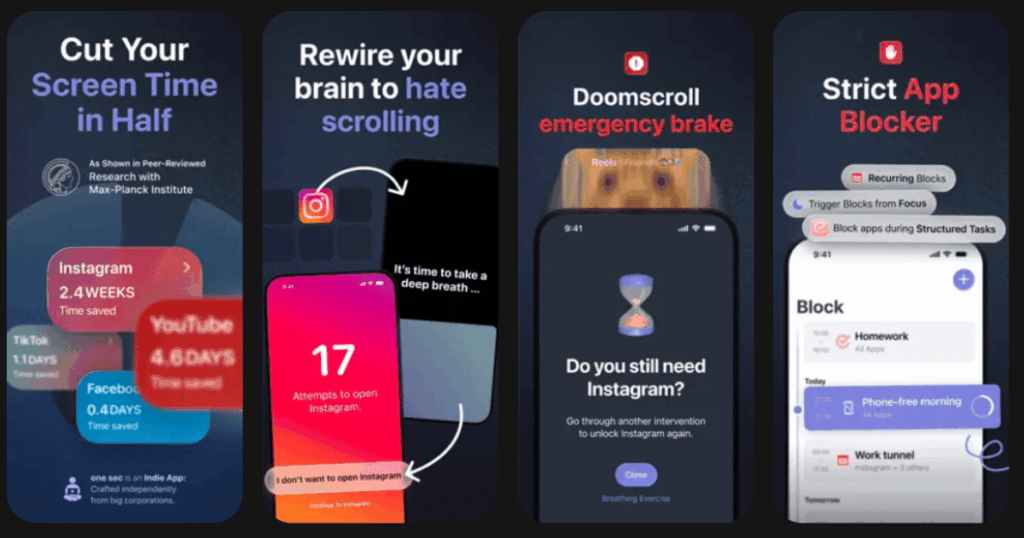
One Sec adds a pause before you can open distracting apps. When you tap Instagram or TikTok, it makes you take a deep breath first. This small friction breaks the automatic habit.
The app uses behavioral science to change your relationship with your phone. After the breathing exercise, you decide if you really want to proceed. Most people find they do not actually need to open the app. Usage insights show your progress over time.
Key Features:
- Breathing exercises and intention prompts before opening selected apps
- Customizable delay activities including tapping, rotating your phone, and journaling
- Usage tracking that shows how often you backed out versus continued
What I like: One Sec does not just block apps. It makes me more aware of my habits. The breathing pause feels natural. I often realize I was opening apps out of boredom, not need. The data showing how many times I chose not to proceed is motivating.
What I don’t like: Setup requires using iOS Shortcuts, which can be confusing at first. The app takes some effort to configure properly. The price feels steep for what seems like a simple concept.
Pricing: Limited free version. Monthly, yearly, or lifetime subscription options.
Platforms: iOS and Android
#6. Forest – Best for Staying Focused Through Gamification
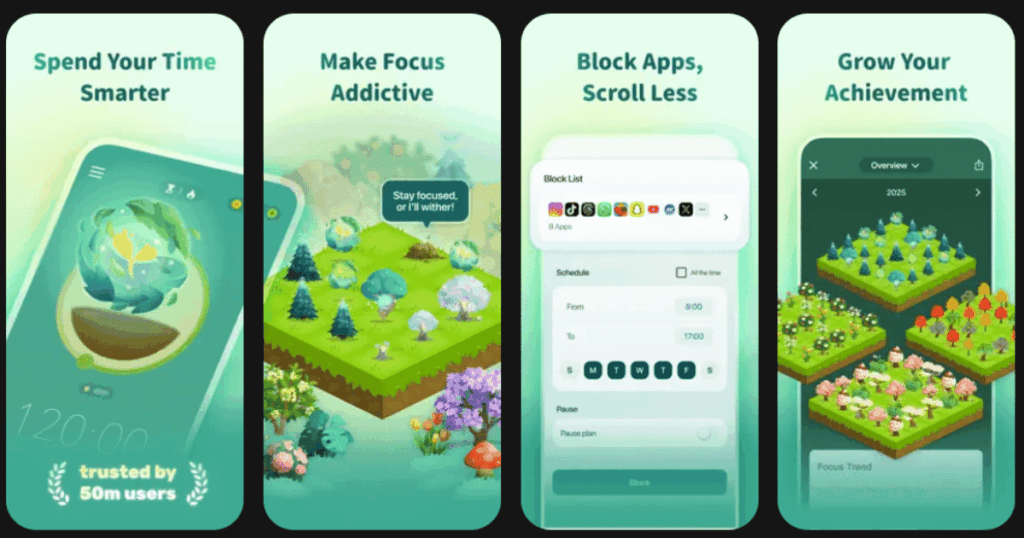
Forest turns focus time into a game. When you want to concentrate, you plant a virtual tree. If you leave the app to check social media, your tree dies. Stay focused and grow a beautiful forest.
The app partners with a real tree planting organization. Your virtual focus time contributes to planting actual trees. This adds meaning to your productivity. Many students and professionals swear by Forest for getting work done.
Key Features:
- Virtual tree planting that grows when you stay focused and dies if you leave
- Real tree planting through partnership with Trees for the Future organization
- Statistics tracking your focus history and forest growth over time
What I like: Forest makes focus feel rewarding. I hate seeing my virtual trees die. That emotional connection keeps me on task. Knowing my focus time helps plant real trees adds extra motivation. The visual forest of my productivity is satisfying to look at.
What I don’t like: The app is more of a timer than a full screen time solution. It does not block apps aggressively. If you have strong willpower issues, you might kill a lot of trees at first.
Pricing: One-time purchase for full features. Some additional in-app purchases available.
Platforms: iOS and Android
#7. ScreenZen – Best for Customizable Screen Time Limits
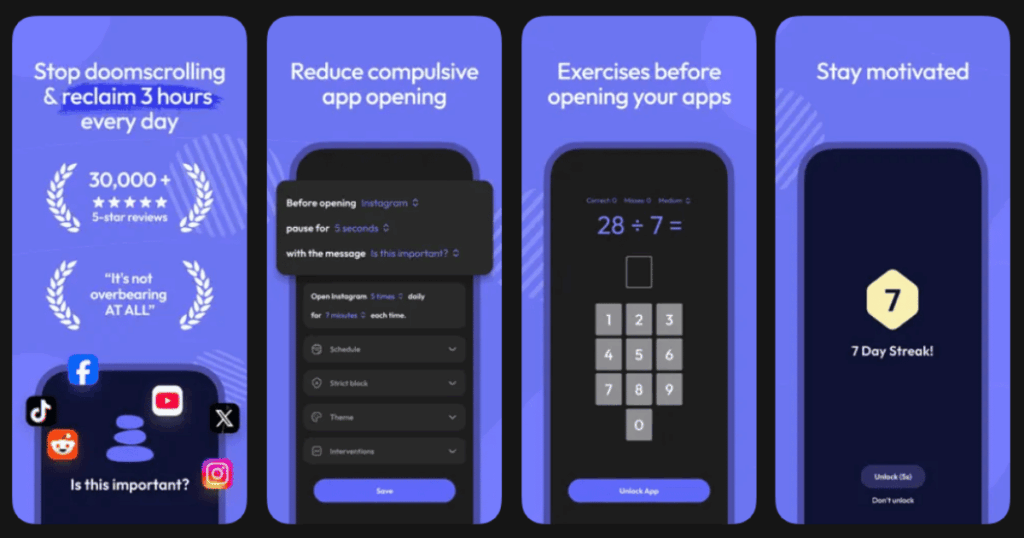
ScreenZen combines features from multiple screen time apps. You can set exact limits for how many times and how long you use certain apps. It pushes you toward off-screen activities when limits hit.
The app works on iOS, Android, and macOS. All features are free, though developers suggest optional donations. ScreenZen is perfect for people who want granular control without paying subscription fees.
Key Features:
- Precise control over app usage times and number of opens per day
- Breathing exercises and activity prompts when trying to access limited apps
- Cross-platform support for phone and computer
What I like: ScreenZen gives me the control I want without a subscription. I can set specific limits for different apps. The prompts to do breathing exercises feel helpful, not annoying. Getting the same experience on my Mac and phone is convenient.
What I don’t like: The interface looks plain compared to flashier apps like Opal. Some users might want more visual polish. The app relies on donations, so long-term development is uncertain.
Pricing: Completely free with optional donations for lifetime access.
Platforms: iOS, Android, and macOS
#8. Before Launcher – Best for Text-Only Phone Experience
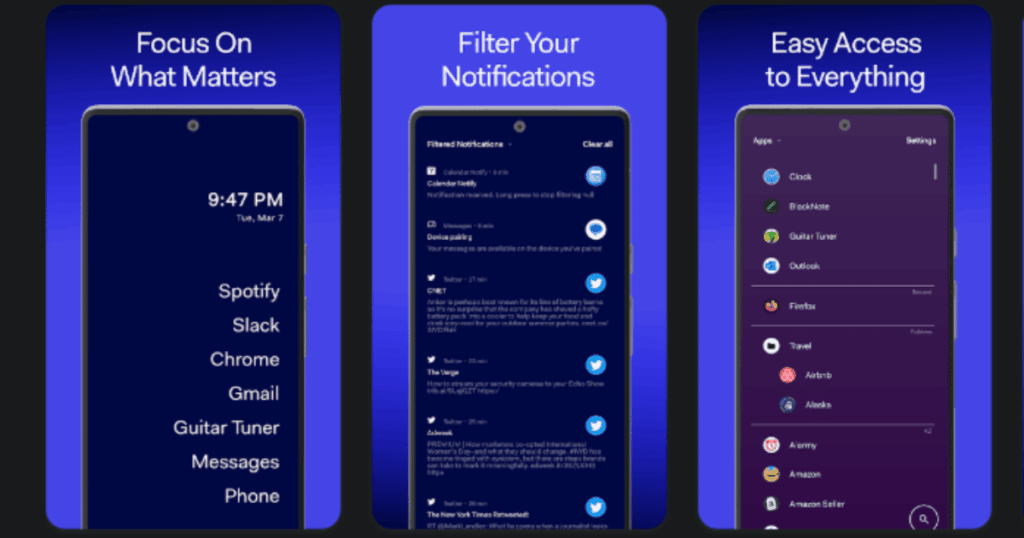
Before Launcher strips your phone down to pure text. No icons, no colors, just app names on a clean background. Users report opening their phones 40% less often.
The launcher includes focus modes and filtered notifications. You can customize fonts and backgrounds. Before Launcher targets people who want the most extreme minimalist experience possible.
Key Features:
- Text-only interface with no app icons visible anywhere
- Focus modes that hide certain apps during specified times
- Customizable fonts, backgrounds, and notification filtering
What I like: Before Launcher is the most hardcore minimalist option I have tried. Seeing just text makes my phone feel like a tool, not a toy. The focus modes help me stay productive during work hours. My phone addiction decreased noticeably after switching.
What I don’t like: The learning curve is steep. Finding apps without icons takes time. Some people will find it too extreme for daily use.
Pricing: Free version available. Pro version with additional features.
Platforms: Android only
#9. Blank Spaces – Best for Creating a Calm Home Screen
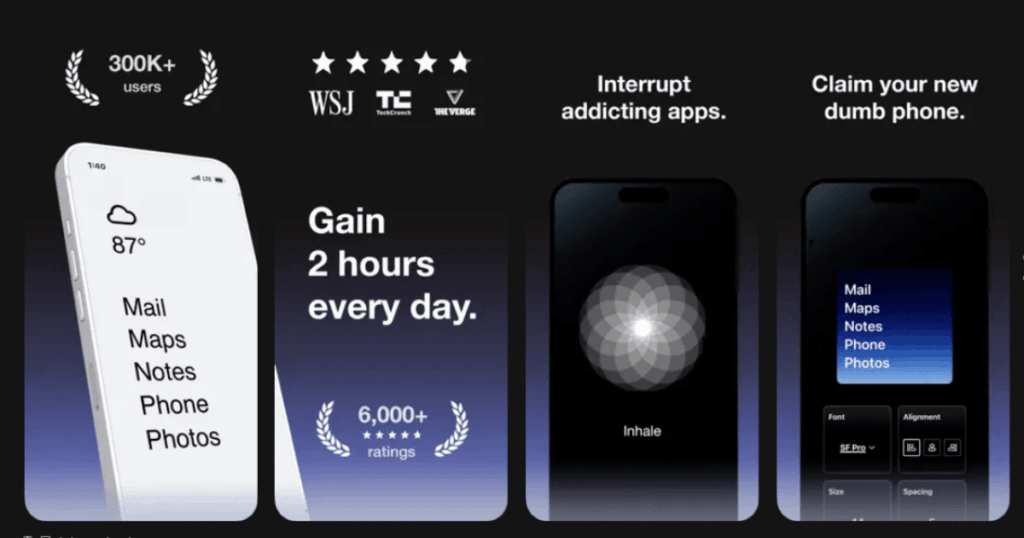
Blank Spaces helps you design a peaceful iPhone home screen. You can create invisible widgets and hide apps behind clean layouts. The result is a serene, uncluttered look.
The app works with iOS widget system. You can add motivational quotes or simple design elements. Blank Spaces appeals to people who want aesthetics along with functionality.
Key Features:
- Invisible widgets that create clean gaps on your home screen
- Custom widget designs with quotes, patterns, or solid colors
- Easy app hiding without removing them from your phone
What I like: Blank Spaces let me finally achieve the calm iPhone aesthetic I wanted. My home screen looks beautiful and minimal. The invisible widgets create perfect spacing. I feel less anxious every time I unlock my phone now.
What I don’t like: It takes effort to set up initially. You need to plan your layout carefully. The app only works with iOS widget limitations.
Pricing: One-time purchase for full features.
Platforms: iOS only
What Is the Best Free Minimalist App?
ScreenZen stands out as the best completely free minimalist app. It offers premium-level features without any subscription costs. You get precise app limits, breathing prompts, and cross-platform support.
The developers fund the app through optional donations. This means you can use everything without paying anything. For budget-conscious users, ScreenZen provides excellent value. It rivals paid apps in functionality while costing nothing.
However, if you want a free launcher experience, Niagara Launcher’s free version is also excellent. It includes the core minimalist features that make it popular. The Pro upgrade adds nice extras but is not required.
Do Minimalist Apps Actually Reduce Screen Time?
Yes, research and user reports confirm minimalist apps work. The key is adding friction between you and distracting apps. Studies show that even small delays reduce impulsive behavior.
Apps like One Sec use this principle directly. The breathing pause interrupts your automatic habits. Minimalist Phone reports that 93% of users see reduced screen time within three days. Niagara Launcher users say they pick up their phones less often.
The secret is consistency. These apps work best when you commit to using them. Trying an app for one day will not change habits built over years. Give any minimalist app at least two weeks before judging its effectiveness.
Can I Use Multiple Minimalist Apps Together?
Absolutely. Many users combine different apps for maximum effect. A popular approach pairs a minimalist launcher with a screen time blocker. This way you get both a clean interface and hard limits.
For example, you might use Niagara Launcher for your home screen and Opal for app blocking. Add Forest for work sessions and Life7 for stress relief. Each app targets a different aspect of phone wellness.
Start with one app and add others gradually. Too many changes at once can feel overwhelming. Find what works for your specific struggles. Some people need strict blocks while others benefit from gentle reminders. Experiment until you find your perfect combination.