
9 Best Mental Health Apps For Employees
| App Name | Best For | Key Features | AC Rating | Pricing |
|---|---|---|---|---|
| Life7 | All in one mental wellness | Binaural beats, CBT, sleep stories, breathing exercises | 4.8/5 | Weekly, monthly, yearly plans available |
| Headspace | Guided meditation beginners | Mini meditations, SOS sessions, sleep sounds | 4.6/5 | Monthly or annual subscription |
| Calm | Sleep and stress relief | Sleep stories, nature sounds, breathing exercises | 4.7/5 | Monthly or annual subscription |
| Talkspace | Professional online therapy | Licensed therapists, psychiatry, video sessions | 4.4/5 | Insurance accepted, subscription plans |
| BetterHelp | Flexible therapy access | Text, phone, video sessions, financial aid | 4.3/5 | Weekly subscription |
| Sanvello | CBT based self help | Mood tracking, guided journeys, community support | 4.4/5 | Free version, premium available |
| Woebot | AI powered mental health support | CBT chatbot, daily check ins, mood tracking | 4.5/5 | Free |
| Daylio | Mood tracking and journaling | Quick mood logs, habit tracking, pattern insights | 4.6/5 | Free version, premium available |
| Happify | Science based emotional wellness | Games, activities, resilience building | 4.2/5 | Free version, premium available |
#1. Life7 – Best for All in One Mental Wellness

Life7 stands out as the most complete mental wellness app I have found for employees. It offers everything you need in one place. You get access to meditation, sleep support, breathing exercises, and so much more.
The app has earned over 1200 editorial mentions. Users have logged more than 312 million meditation minutes. That tells you people really love using it.
What makes Life7 special is its variety. You can find green noise, white noise, brown noise, and pink noise. There are brainwave frequencies like delta, theta, alpha, beta, and gamma waves. You also get pure binaural beats and solfeggio frequencies for deep healing.
Key Features:
- SOS sessions for anxiety and panic attacks plus CBT and hypnotherapy for emotional healing
- Sleep stories for adults and children with 8D audio and REM sleep music
- Daily sessions including meditation, music therapy, and wisdom with progress tracking
What I like: Life7 really covers all the bases. I appreciate how it combines ancient practices like transcendental meditation with modern tools like vagus nerve stimulation. The gamified approach keeps me coming back. You earn XP and unlock new soundscapes by completing sessions. The daily check in feature helps me track my mood and save thoughts for each day. The backdrop mode lets me mix soundscapes with other audio which is pretty cool.
What I don’t like: The free content is a bit limited. You really need to subscribe to get the full experience. But the 7 day free trial lets you test everything before committing.
Pricing: Life7 offers a 7 day free trial. After that you can choose weekly, monthly, or yearly plans. They run frequent special offers too.
Platforms: iOS and Android
#2. Headspace – Best for Guided Meditation Beginners
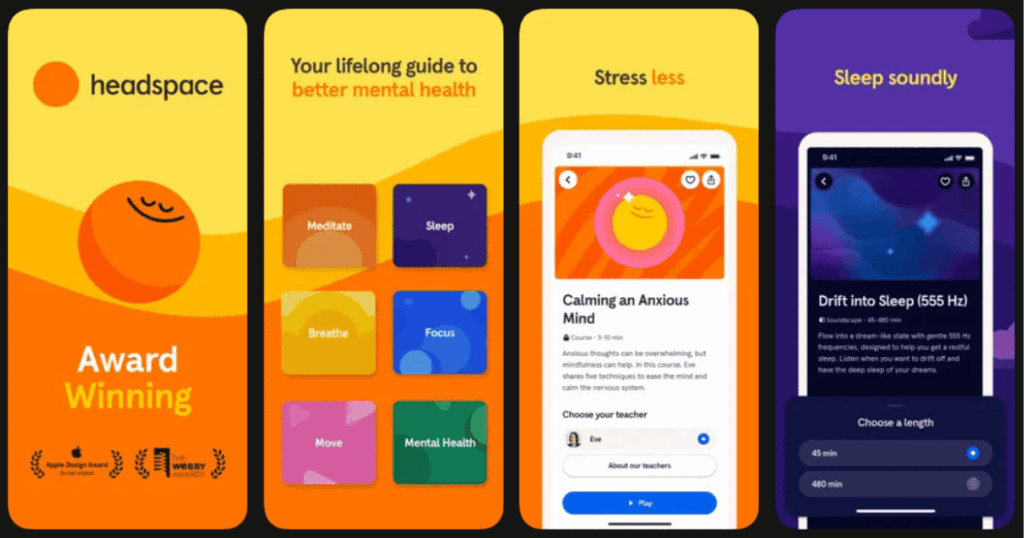
Headspace is one of the most popular meditation apps in the world. Over 2.8 million people subscribe to it. Companies like Google, LinkedIn, and Monzo offer it to their employees as a benefit.
The app focuses on making meditation simple and easy to understand. It uses fun animations to teach you the basics. This approach works great for people who are new to mindfulness.
Headspace offers content for sleep, focus, stress, and more. The sessions range from just a few minutes to longer deep dives.
Key Features:
- Mini meditations perfect for busy schedules and breaks between meetings
- SOS sessions for unexpected stressful situations at work
- Sleep sounds, sleepcasts, and wind down exercises
What I like: The teaching style really sets Headspace apart. The animated videos explain concepts in a way that sticks with you. I found the mini meditations super helpful during my work day. You can squeeze them in between meetings or during lunch. The app tracks your progress which helps build a habit over time.
What I don’t like: Some features are not available offline. You need an internet connection for much of the content. The app also focuses more on individual practice than team engagement which might not suit every workplace.
Pricing: Monthly subscription around $12.99 or annual plan around $69.99. There is a 14 day free trial available.
Platforms: iOS and Android
#3. Calm – Best for Sleep and Stress Relief
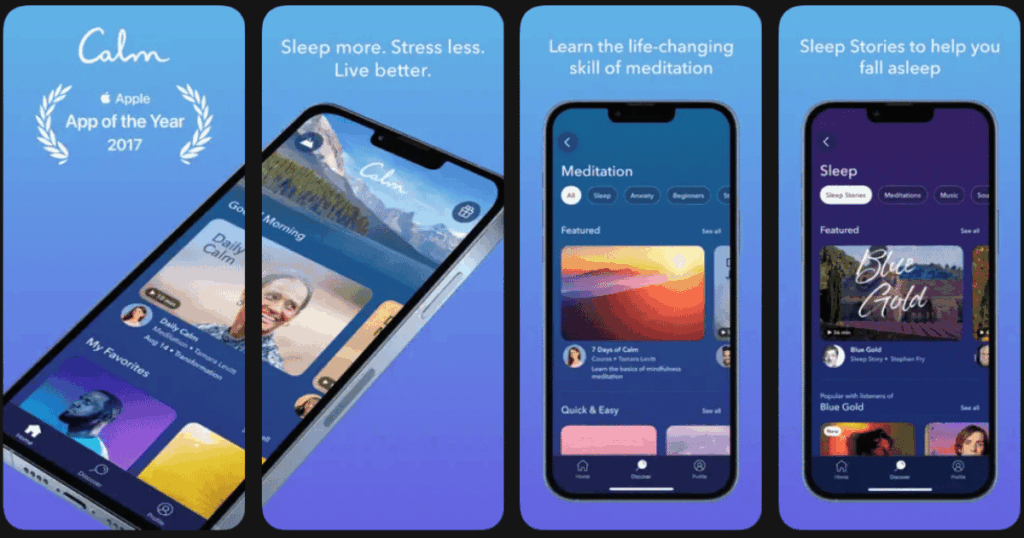
Calm has built its reputation as the go to app for better sleep and stress relief. It offers over 500 sleep stories narrated by celebrities and experts. The app has been downloaded over 100 million times worldwide.
Many employees struggle with sleep because of work stress. Calm directly addresses this problem. The content is designed to quiet your mind and help you drift off peacefully.
The app also works well during the day for quick stress relief. The Breathe Bubble feature takes just 60 seconds.
Key Features:
- Celebrity narrated sleep stories that help you fall asleep faster
- Panic SOS feature for moments when stress feels overwhelming
- Daily Calm meditation that updates with fresh content each day
What I like: The variety of sleep stories keeps things fresh. I never get bored because there is always something new to try. The nature sounds and soundscapes create a calming atmosphere. I also appreciate how the app integrates with workplace wellness programs. Calm Health is specifically built for employees and links to other company resources.
What I don’t like: Some content requires a subscription to access. Individual focus means it lacks specific features for team building around wellness. The app works best for relaxation but may not address deeper mental health needs.
Pricing: Annual subscription around $39.99. Corporate plans start around $3 to $5 per employee per month. Free version available with limited features.
Platforms: iOS and Android
#4. Talkspace – Best for Professional Online Therapy
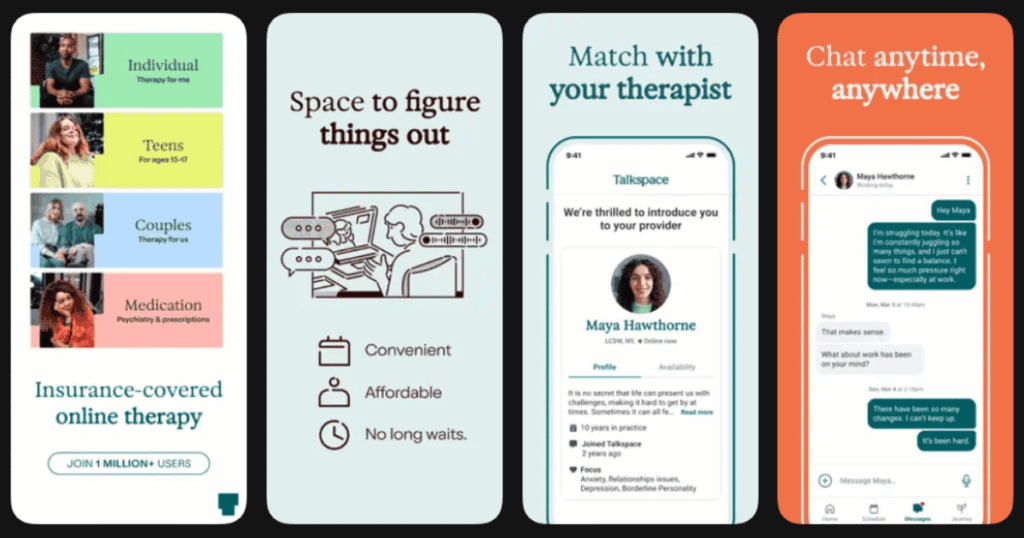
Talkspace connects employees with licensed therapists and psychiatrists. It is one of the most trusted names in online therapy. Over one million people use the platform.
What sets Talkspace apart is the ability to message your therapist anytime. You do not have to wait for a scheduled appointment. This flexibility works great for busy employees.
The platform also offers psychiatry services. You can get evaluated and receive medication if needed. This makes it a complete mental health solution.
Key Features:
- Unlimited text, voice, and video messaging with licensed therapists
- Psychiatry services including diagnosis and medication management
- Specialized matching to find therapists who fit your specific needs
What I like: The messaging feature is a game changer. I could reach out whenever something was bothering me. The therapist matching process found someone who really understood my situation. Talkspace accepts many insurance plans which can save money. The Talkspace Go app also offers self guided programs for everyday issues.
What I don’t like: Without insurance it can get pricey. Some users feel the virtual format misses nuances that show up in person. You might need to try a few therapists before finding the right fit.
Pricing: Plans start around $69 per week for messaging only. Many users access through employer programs or insurance at no cost. Average insurance copay around $15.
Platforms: iOS and Android
#5. BetterHelp – Best for Flexible Therapy Access

BetterHelp is one of the largest online therapy platforms in the world. Over 4 million people have used it. The platform makes therapy accessible and convenient.
You can connect with your therapist through text, phone, video, or live chat. This flexibility means you can choose what feels most comfortable. Sessions fit into your schedule instead of the other way around.
BetterHelp matches you with a therapist based on your questionnaire answers. If the match is not right you can switch easily.
Key Features:
- Multiple communication options including text, phone, video, and live chat
- Financial aid available for those with limited income
- Group therapy sessions and classes included in subscription
What I like: The flexibility really stands out. I could message my therapist when thoughts came up and did not have to wait. The financial aid program made it affordable for me. The ability to switch therapists without hassle helped me find someone who clicked. Group sessions added extra value beyond one on one therapy.
What I don’t like: BetterHelp does not accept insurance at this time though they plan to add it. Some users report technical issues with the app. Costs vary based on location and demand.
Pricing: Weekly subscription ranges from $65 to $100 depending on location. Financial aid can reduce costs by 10 to 40 percent.
Platforms: iOS and Android
#6. Sanvello – Best for CBT Based Self Help

Sanvello offers a complete toolkit for managing anxiety and stress. It combines therapy techniques, coaching, and community support in one app. The approach is based on cognitive behavioral therapy which is proven to work.
The app helps you identify thought patterns that affect your mood. You learn to challenge negative thinking and build healthier habits. Guided journeys walk you through specific issues step by step.
Sanvello recently partnered with AbleTo to offer virtual coaching and therapy services. This expands what employees can access through the platform.
Key Features:
- CBT based tools and exercises for managing anxiety and depression
- Peer community support where you connect with others facing similar challenges
- Mood tracking that helps you spot patterns over time
What I like: The guided journeys helped me work through specific problems. It felt like having a workbook with support built in. The community aspect made me feel less alone. Connecting with others who understood my struggles was powerful. The mood tracking revealed patterns I had never noticed before.
What I don’t like: The app transition from the original Sanvello version caused some navigation issues. Professional therapy and coaching require specific insurance plans. The free version has limited offerings.
Pricing: Free version with limited features. Premium self care at around $8.99 monthly. Therapy and coaching through insurance only.
Platforms: iOS and Android
#7. Woebot – Best for AI Powered Mental Health Support

Woebot is a unique app that uses artificial intelligence to provide support. It acts like a friendly mental health coach available 24/7. You can chat with Woebot anytime day or night.
The AI is trained in cognitive behavioral therapy techniques. It helps you work through stressful moments in real time. The conversations feel natural and supportive.
Woebot is especially helpful when you need immediate support but a human therapist is not available. It bridges the gap between self help and professional care.
Key Features:
- AI chatbot trained in CBT, DBT, and mindfulness techniques
- Daily check ins that help you reflect on emotions and patterns
- Available 24/7 with no scheduling or waitlists
What I like: Having support available at 2am made a real difference for me. The conversations actually felt caring and helpful. Woebot taught me to identify cognitive distortions in my thinking. The privacy focused approach helped me open up more. The app is completely free which removes any barrier to getting started.
What I don’t like: Some people prefer human connection over AI interaction. The app cannot replace professional therapy for serious issues. It is currently only available in the US.
Pricing: Free
Platforms: iOS and Android
#8. Daylio – Best for Mood Tracking and Journaling

Daylio makes tracking your mental health incredibly simple. You log your mood with just a few taps. No lengthy journaling required unless you want to add notes.
The app shows you patterns over time. You start to see what activities and situations affect your mood. This awareness is powerful for making positive changes.
For employees, Daylio helps identify work related stress triggers. You can spot when certain meetings or deadlines impact your mental state.
Key Features:
- Quick mood logging that takes just seconds each day
- Activity tracking that links mood to daily habits
- Visual statistics and charts that reveal patterns
What I like: The simplicity kept me consistent. I actually stuck with it unlike other journaling apps I tried. The insights surprised me. I discovered my mood always dropped after certain activities. The customization options let me track exactly what matters to me. Colorful charts made reviewing my data enjoyable.
What I don’t like: The app focuses on tracking rather than teaching coping skills. You need to interpret the data yourself. Some advanced features require the premium version.
Pricing: Free version with ads. Premium available for one time purchase or subscription.
Platforms: iOS and Android
#9. Happify – Best for Science Based Emotional Wellness

Happify takes a unique approach to mental health through games and activities. The content is based on positive psychology research. It aims to boost happiness and build resilience over time.
The app offers personalized tracks targeting specific areas. You might work on stress management, confidence, or mindfulness. The activities feel engaging rather than like homework.
For workplace mental health Happify helps employees build emotional skills. These skills carry over into better performance and relationships at work.
Key Features:
- Science based games and activities that boost emotional wellbeing
- Personalized tracks for stress, confidence, mindfulness and more
- Progress tracking that shows improvement over time
What I like: The gamified approach made mental health work feel fun. I looked forward to completing activities each day. The tracks helped me focus on one area at a time. I noticed real improvements in how I handled stress. The app feels different from typical meditation apps which kept things interesting.
What I don’t like: Some people may not connect with the game style format. The approach works better for mild stress than serious mental health issues. Full access requires a premium subscription.
Pricing: Free version with limited access. Premium subscription available.
Platforms: iOS and Android
How Do Mental Health Apps Help Employees at Work?
Mental health apps give employees tools they can use anytime and anywhere. You do not have to schedule an appointment or leave the office. Just pull out your phone and access support in minutes.
These apps teach practical skills for managing stress. Breathing exercises can calm you before a big presentation. Meditation helps clear your mind during a busy day. CBT techniques help you handle difficult coworkers or challenging projects.
Research shows that companies using mental health apps see real results. Employees report less stress and better focus. Absenteeism goes down. Engagement goes up. Some studies show a return of $4 for every $1 spent on mental health initiatives.
The privacy of apps also matters. Some employees feel uncomfortable seeking traditional therapy. Apps let them get support without anyone knowing. This privacy encourages more people to take care of their mental health.
Are Mental Health Apps as Effective as Traditional Therapy?
Mental health apps work best as a supplement to professional care. They are not meant to replace therapy for serious conditions. But for mild to moderate stress and anxiety they can make a real difference.
Studies show that apps using CBT techniques actually reduce symptoms. One study found Woebot decreased depression scores in just two weeks. Headspace users showed improved stress and resilience. These results come from real clinical research.
The key is matching the app to your needs. If you struggle with work stress a meditation app might help. If you need professional guidance consider Talkspace or BetterHelp. For daily tracking try Daylio or Sanvello.
Many experts recommend using apps alongside other support. Talk to a therapist when needed. Use the app between sessions to practice skills. This combined approach often works better than either option alone.
What Should Employers Look for When Choosing Mental Health Apps?
Employers should start by surveying their teams. Find out what employees actually need. Some might want meditation while others need therapy access. A diverse selection works better than one size fits all.
Privacy and security matter a lot. Employees will not use apps if they worry about data being shared. Look for apps with clear privacy policies and strong encryption. Make sure the company cannot see individual usage data.
Ease of use determines whether people actually engage. Apps should be intuitive and quick to navigate. If an app is frustrating employees will abandon it. Test apps yourself before rolling them out company wide.
Evidence based approaches deliver better results. Look for apps that use proven techniques like CBT. Check if the app has clinical research supporting its effectiveness. Avoid apps making big claims without scientific backing.
Finally consider how the app fits into your overall wellness program. The best results come from combining apps with other resources. Promote usage without making it feel mandatory. Create a culture where mental health support is normal and encouraged.