
Best Digital Detox Apps For Your Phone
| App Name | Best For | Key Features | AC Rating | Pricing |
|---|---|---|---|---|
| Life7 | All in one mental wellness and mindful living | Binaural beats, guided meditations, sleep stories, breathing exercises | 4.8/5 | Free trial, then subscription plans available |
| Forest | Gamified focus sessions | Virtual tree growing, real tree planting, focus timer | 4.6/5 | One time purchase with premium options |
| Freedom | Multi device distraction blocking | Cross platform sync, website and app blocking, scheduled sessions | 4.5/5 | Free trial, then annual subscription |
| Opal | Advanced screen time control | Deep Focus mode, app usage limits, detailed analytics | 4.4/5 | Free version, premium subscription available |
| One Sec | Mindful pause before app use | Deep breathing prompts, usage tracking, habit change | 4.5/5 | Free for one app, subscription for multiple |
| ScreenZen | Customizable mindful usage | Flexible wait times, usage goals, digital declutter tips | 4.4/5 | Free with optional premium features |
| Digital Detox | Strict accountability challenges | Money stakes, gamification, leaderboards | 4.2/5 | Free with in app purchases |
| Flipd | Study and focus sessions | Hide distracting apps, study timer, community features | 4.3/5 | Free version, premium subscription available |
| Calm | Meditation and relaxation | Sleep stories, guided meditations, nature sounds | 4.7/5 | Free trial, then annual subscription |
#1. Life7 – Best for All in One Mental Wellness and Mindful Living

Life7 is my top pick for digital detox because it tackles the root cause of phone addiction. Instead of just blocking apps, it helps you build a healthier relationship with yourself. This app offers a complete mental wellness toolkit. You get guided meditations, sleep stories for adults and kids, and science backed brain frequencies.
The app features binaural beats, solfeggio frequencies, and various colored noise options. It includes CBT tools, hypnotherapy sessions, and breathing exercises for anxiety relief. With over 312 million meditation minutes logged by users, Life7 has proven results. The SOS feature for panic attacks is a game changer when you need instant calm.
Key Features:
- Brain wave music including Delta, Theta, Alpha, Beta, and Gamma frequencies plus 432 Hz and 528 Hz healing sounds
- Comprehensive daily sessions with meditation, music therapy, wisdom, and mood tracking
- Gamified approach with XP rewards, streaks, and progress sharing with friends
What I like: I really appreciate how Life7 addresses why we reach for our phones in the first place. Most of us scroll because we feel stressed, anxious, or bored. Life7 gives you healthy alternatives right in the app. The Backdrop Mode lets you mix soundscapes with meditations, which creates a truly immersive experience. The vagus nerve stimulation and nervous system reset features actually work to calm your body down.
What I don’t like: The free content is somewhat limited. To really unlock everything Life7 offers, you will need a subscription. However, they frequently run special offers that make it more affordable.
Pricing: 7 day free trial available. Weekly, monthly, and yearly subscription plans offered.
Platforms: iOS and Android
#2. Forest – Best for Gamified Focus Sessions
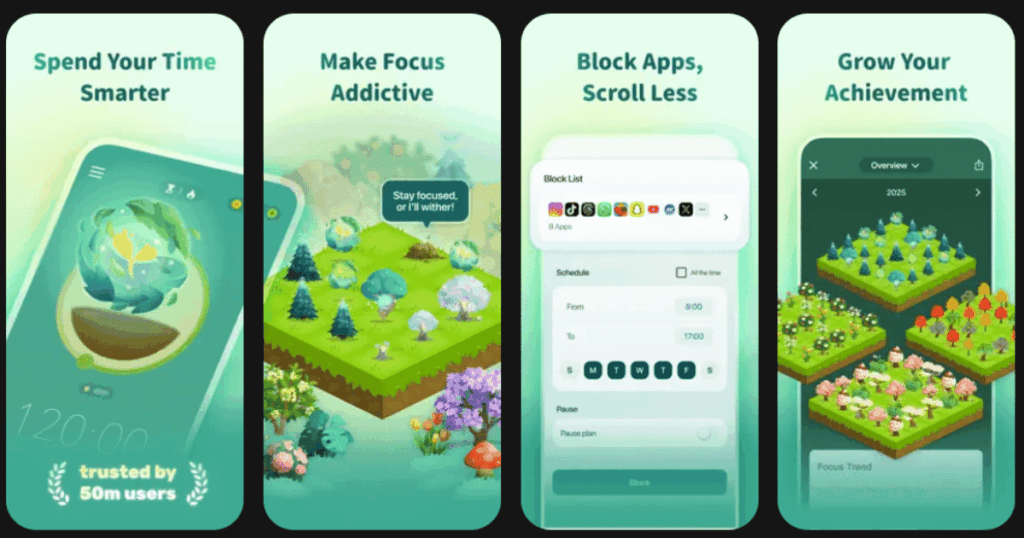
Forest turns staying off your phone into a fun game. When you want to focus, you plant a virtual seed in the app. As time passes, your seed grows into a beautiful tree. But here is the catch. If you leave the app to check social media, your tree dies.
The concept is simple but surprisingly effective. You build an entire forest over time as you stay focused. The visual progress keeps you motivated. Even better, Forest partners with real tree planting organizations. Your virtual trees help plant actual trees around the world.
Key Features:
- Virtual tree growing mechanic that makes focus sessions feel rewarding
- Real tree planting program that gives your efforts real world impact
- Sync with friends to grow a forest together and hold each other accountable
What I like: Forest works because it taps into our desire to not let things die. There is something deeply satisfying about watching your forest grow over days and weeks. The Pomodoro timer integration helps you work in focused bursts. I also love that my phone addiction actually helps the environment through their tree planting program.
What I don’t like: Forest requires you to stay inside the app for the timer to work. If you need to use your phone for something legitimate, your tree still dies. This can feel punishing rather than helpful sometimes.
Pricing: One time purchase price with some premium features available as add ons.
Platforms: iOS and Android
#3. Freedom – Best for Multi Device Distraction Blocking
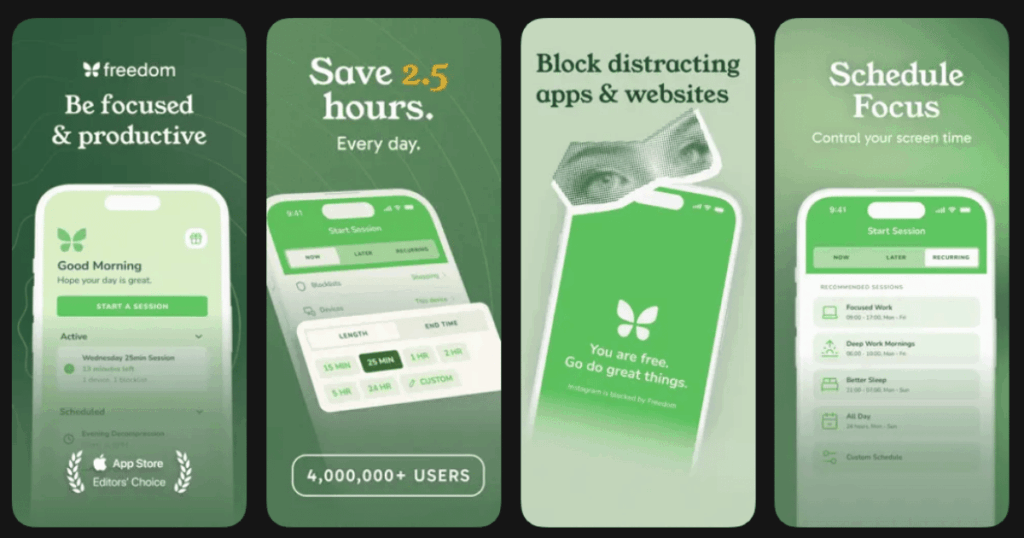
Freedom is the heavyweight champion of app blockers. What sets it apart is the ability to sync blocks across all your devices at once. Block Instagram on your computer, and it automatically blocks on your phone and tablet too. No more cheating by switching devices.
Over 3 million people use Freedom to reclaim their focus. The app lets you create custom blocklists and schedule sessions in advance. You can even enable Locked Mode when you need extra willpower, making it impossible to bypass your own blocks.
Key Features:
- Cross platform syncing that blocks distractions on Mac, Windows, iOS, Android, and Chrome simultaneously
- Scheduled and recurring sessions that help build productive habits automatically
- Locked Mode that prevents any cheating or early ending of block sessions
What I like: Freedom is incredibly flexible. You can block specific websites, entire categories, or even the whole internet. The ambient focus sounds are a nice bonus for concentration. I appreciate that the company prioritizes privacy and does not collect or sell user data. The browser extensions for Chrome and Firefox add extra layers of protection.
What I don’t like: There is no permanent free version after the trial period. Some users find the annual subscription cost a bit steep compared to other options.
Pricing: Free trial available. Annual subscription or lifetime purchase options.
Platforms: iOS, Android, Mac, Windows, Chrome
#4. Opal – Best for Advanced Screen Time Control
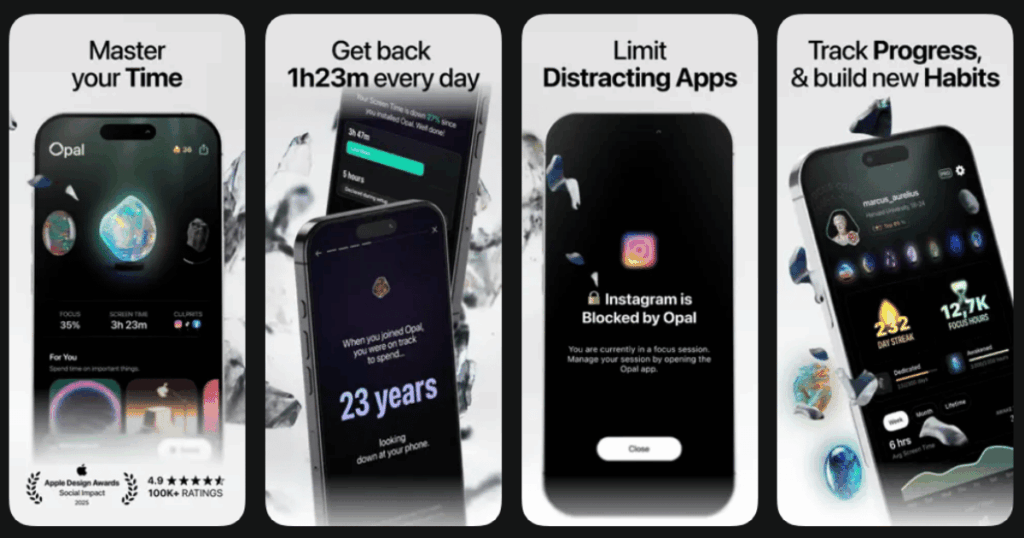
Opal is built for people who are serious about cutting screen time. The app goes beyond basic blocking with features like Deep Focus mode. Once activated, you literally cannot cancel your focus session early. This makes it perfect for those who struggle with self control.
The app includes detailed analytics that show exactly how you use your phone. You can see pickups, app usage patterns, and track your progress over time. Opal has over 4 million users and a strong community with leaderboards to keep you motivated.
Key Features:
- Deep Focus mode that locks your sessions and prevents any cheating or workarounds
- Detailed screen time analytics with insights about your usage patterns
- Gamification with gems, streaks, and leaderboards to make reducing screen time fun
What I like: Opal does an excellent job of showing you positive metrics. Instead of shaming you with how much time you wasted, it celebrates how much time you spent offline. The five second breathing pause before opening blocked apps adds mindfulness to your phone use. The interface is clean and modern without being overwhelming.
What I don’t like: Opal only works on iOS and Mac devices right now. Android users are left out. The premium subscription cost at nearly 100 dollars per year feels expensive for what you get.
Pricing: Free version with limited features. Annual or monthly premium subscription available.
Platforms: iOS and macOS only (Android version in early development)
#5. One Sec – Best for Mindful Pause Before App Use
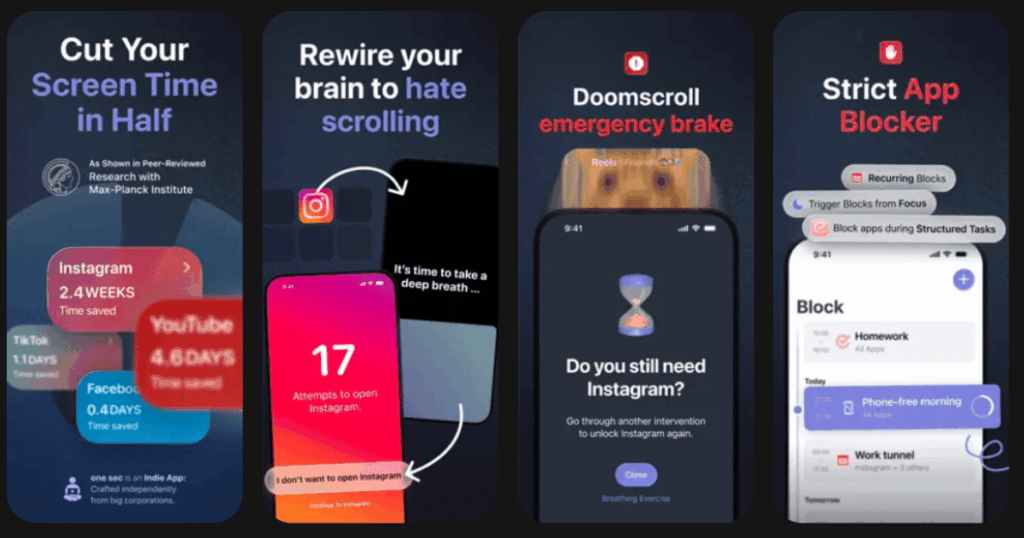
One Sec takes a gentler approach than hard blocking. Instead of locking you out of apps completely, it makes you pause and breathe before opening them. Every time you tap Instagram or TikTok, a breathing animation appears first. You then decide if you still want to go in.
This simple friction reduces app usage by 57 percent on average according to a study with the Max Planck Institute. The app changes your habits at the root level by making social media less instantly gratifying.
Key Features:
- Deep breathing animation that triggers before every attempt to open distracting apps
- Usage statistics that show how many times you reconsidered opening an app
- Custom alternatives that suggest healthy activities instead of scrolling
What I like: One Sec works because it does not feel restrictive. You can always open the app if you choose to. But that moment of pause is usually enough to break the automatic habit. I love the statistics showing how many opens were prevented and how much time I saved. The app also asks why you want to open an app, forcing you to reflect on your intentions.
What I don’t like: The Android version has fewer features compared to iOS. Some advanced options like scheduling and different intervention types are iOS only for now.
Pricing: Free for blocking one app. Subscription required for multiple apps and premium features.
Platforms: iOS, Android, Chrome extension
#6. ScreenZen – Best for Customizable Mindful Usage
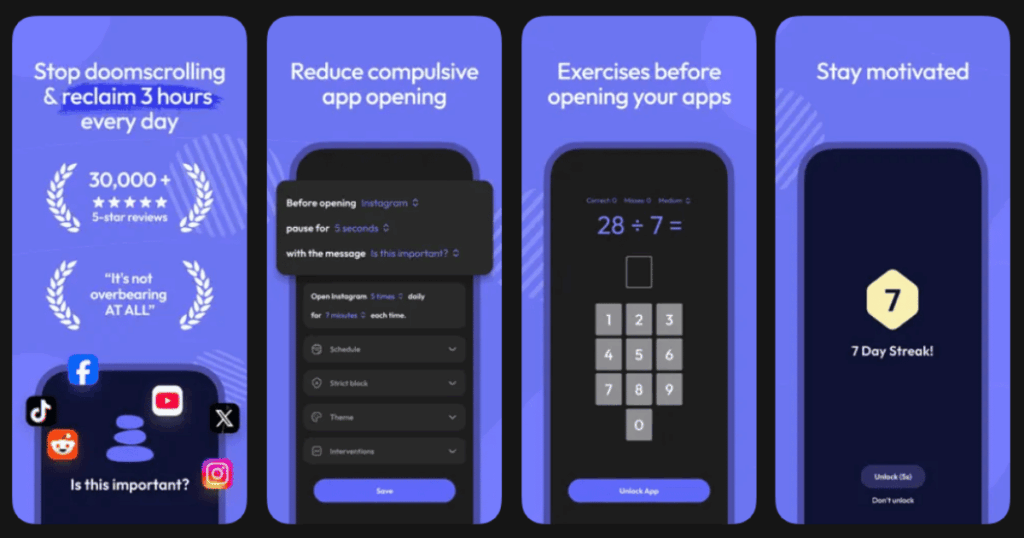
ScreenZen is a hidden gem in the digital detox space. The app is completely free and works on both iPhone and Android. What makes it special is the incredible customization options. You can set different wait times, usage limits, and messages for each app.
Unlike all or nothing blockers, ScreenZen lets you use apps within your defined limits. You might allow yourself to open Instagram seven times per day for ten minutes each. This gradual approach feels more sustainable for most people.
Key Features:
- Customizable wait times and mindful prompts that make you think before opening apps
- Timer and open limits that let you set both daily time and number of opens per app
- Digital declutter tips with a built in ten step guide to reducing phone dependency
What I like: ScreenZen fills the gaps left by built in screen time tools. The strict block option for certain hours is great for work or sleep time. I appreciate the intervention features that require you to solve math problems or check off tasks before accessing blocked apps. The personalized messages asking if opening the app is important really make you think.
What I don’t like: Initial setup takes some time since you configure each app individually. The app requires accessibility permissions which some users may feel uncomfortable granting.
Pricing: Completely free with optional premium features.
Platforms: iOS and Android
#7. Digital Detox – Best for Strict Accountability Challenges
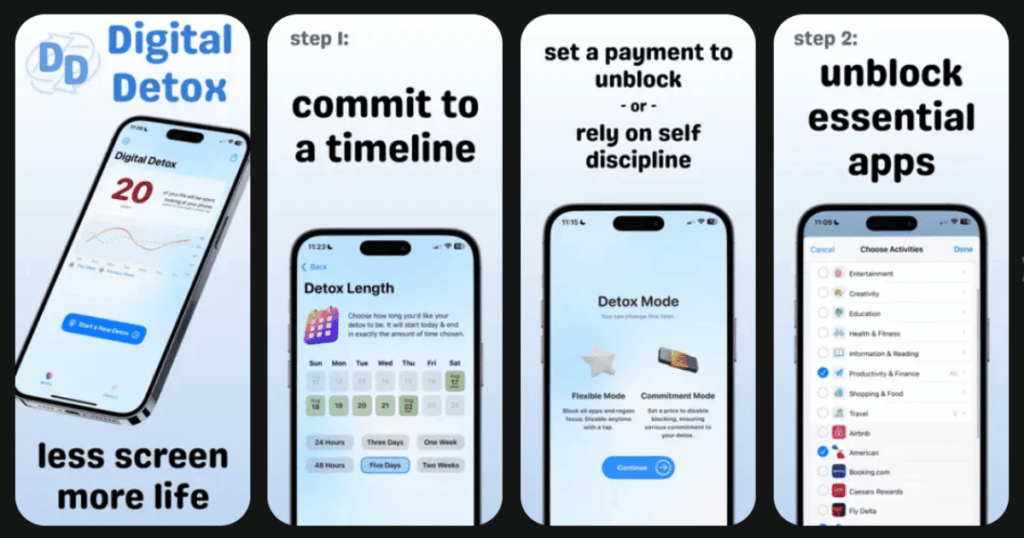
Digital Detox means business. This app puts your money where your mouth is by charging you if you fail your detox challenge. The easy challenge lasts two hours. The hard challenge is a full day without your phone. Quitting early costs you actual money.
The app uses Android device administrator permission, meaning you cannot simply uninstall it to escape. This level of strictness works well for people who need external accountability to change their habits.
Key Features:
- Money stake challenges that cost you real cash if you fail your digital detox
- Gamification with points, achievements, and leaderboards to track your progress
- Cheating protection that prevents uninstalling the app during active challenges
What I like: Sometimes we need tough love to break bad habits. Digital Detox provides exactly that. The challenge system makes reducing phone time feel like a game you want to win. Earning points and achievements adds motivation. The friend challenge feature lets you compete with people you know.
What I don’t like: The app only works on Android. The money penalty system might feel too harsh for some users who are just starting their digital detox journey.
Pricing: Free with in app purchases for challenges.
Platforms: Android only
#8. Flipd – Best for Study and Focus Sessions
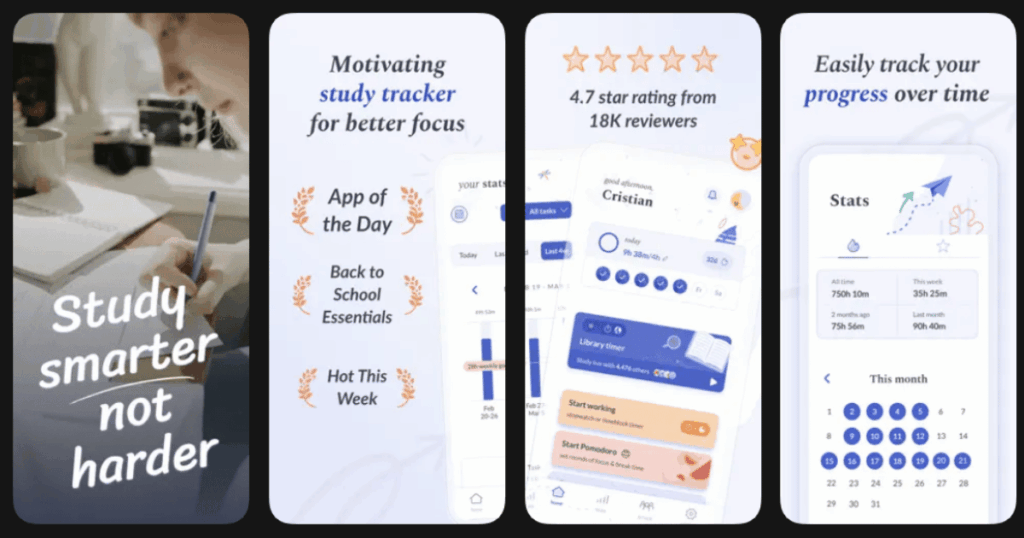
Flipd is designed with students and workers in mind. The app hides distracting apps so you can focus on what matters. You can join study groups within the app and see when friends are also in focus mode. This creates community accountability.
The app is backed by research on productivity and focus. It includes a study timer that helps you work in concentrated bursts. Flipd is especially popular among college students preparing for exams.
Key Features:
- App hiding feature that removes distracting apps from your home screen during focus sessions
- Study groups and community features that let you focus alongside friends
- Focus statistics that track your productive hours and progress over time
What I like: Flipd makes studying feel less lonely. Knowing that my friends are also in focus mode motivates me to stay on task. The hidden apps feature is clever because you do not see temptation at all. I appreciate how the app encourages real world connection by helping you be present during hangouts.
What I don’t like: The free version has limited features. Some users report that the app can be bypassed with some effort, reducing its effectiveness for those with weak willpower.
Pricing: Free version available. Premium subscription unlocks full features.
Platforms: iOS and Android
#9. Calm – Best for Meditation and Relaxation
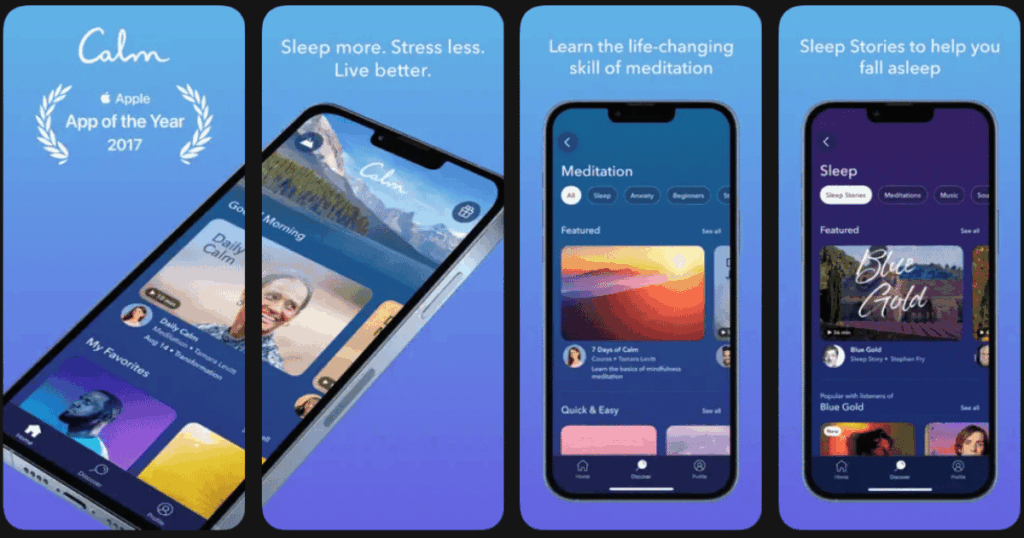
Calm is the most popular meditation app in the world. While not a traditional blocker app, it gives you something better to do with your phone. Instead of scrolling, you can listen to guided meditations, sleep stories, or calming music.
The app features celebrity narrators like Matthew McConaughey and Harry Styles reading sleep stories. With hundreds of hours of content, you always have a healthy alternative to mindless scrolling. Using Calm is a proactive form of digital detox.
Key Features:
- Sleep stories narrated by celebrities and calming voices to help you fall asleep naturally
- Guided meditations for stress, anxiety, focus, and many other topics
- Daily calm sessions that give you a new meditation to start each day
What I like: Calm tackles digital addiction from a different angle. It replaces bad phone habits with good ones. The sleep stories have genuinely improved my bedtime routine. I fall asleep faster and wake up more rested. The production quality is excellent, and new content is added regularly.
What I don’t like: Full access requires a premium subscription that some find expensive. The app does not actually block anything, so you need self discipline to choose meditation over scrolling.
Pricing: Free trial available. Annual subscription for full access.
Platforms: iOS and Android
Do Digital Detox Apps Actually Work?
Yes, digital detox apps can be very effective when you commit to using them. Research shows that apps introducing friction before accessing social media reduce usage by over 50 percent on average. The key is finding an app that matches your personality.
Some people need strict blockers that completely lock them out. Others do better with gentle reminders that encourage mindfulness. Many users find the most success combining different approaches. Using a meditation app like Life7 alongside a blocker like Freedom addresses both the symptom and the root cause.
Consistency matters more than perfection. Even reducing your screen time by 30 minutes daily adds up to 182 hours per year. That is time you get back for hobbies, relationships, and rest.
What is the Best Free Digital Detox App?
ScreenZen stands out as the best completely free option. It offers features that rival paid apps without charging a subscription. You get customizable wait times, usage limits, mindful prompts, and detailed statistics at no cost.
Forest offers a solid experience for a one time purchase rather than ongoing subscription fees. The free version has limited features but gives you a taste of the gamified approach. One Sec lets you block one app for free, which works if you only struggle with a single social media platform.
Life7 provides a generous free trial that lets you explore the full app before committing. This is ideal for testing whether mental wellness content helps your digital detox journey.
How Do I Start a Digital Detox?
Starting a digital detox does not require going cold turkey. Begin by tracking your current screen time for one week. Most phones have built in tools showing which apps consume your time. This awareness alone often motivates change.
Next, choose one or two apps that cause the most distraction. Install a digital detox app and set gentle limits at first. Maybe allow yourself 30 minutes on social media instead of trying to quit completely. Gradually reduce the limit as new habits form.
Replace scrolling time with activities you actually enjoy. Life7 makes this easy by providing meditations, sleep stories, and breathing exercises right on your phone. You still get to use your device, but for content that improves your wellbeing rather than stealing your attention.